Why Skills Change Everything
If you have been using Claude, GitHub Copilot, or any modern AI coding assistant seriously, you have hit the ceiling. The model is incredibly capable, but without context about your workflows, your codebase conventions, and your preferred patterns — it defaults to generic solutions. Every session starts from zero.
Claude Skills (and the broader open agent skills ecosystem) solve exactly this. They are reusable packs of procedural knowledge you install once and every AI session gets smarter. Not smarter in the model sense — smarter in the you sense. Your tools start behaving like a senior teammate who already knows your stack.
This guide covers everything: what skills are, how the universal skill ecosystem works across tools like VS Code Copilot and Claude Code, the anatomy of a skill file, how to build one from scratch (using my actual daily-summary skill as a real example), and which skills are worth installing right now.
What Are Claude Skills?
Skills are modular, self-contained markdown files that give AI agents procedural knowledge. Think of them as onboarding documents — except instead of onboarding a new hire, you are onboarding an AI model into a specific domain, workflow, or workflow pattern.
When a skill is installed, two things happen:
- The skill description (from frontmatter) is always present in the model's context, so it can recognize when to activate the skill.
- The full skill content (the SKILL.md body) loads only when the skill is triggered — either automatically by the model, or manually by the user.
This two-tier loading design is crucial. With 98+ skills installed, you cannot have all of them fully loaded — that would destroy the context window. The description (~100 words) always sits there as a menu the model can consult, and only the relevant skill loads when needed.
The Universal Part — Skills Work Everywhere
Here is the part most guides miss: skills are not Claude-specific. The skill format is an open standard that works across 18+ AI agents:
- GitHub Copilot in VS Code
- Claude Code
- Cursor
- Cline
- Windsurf
- Gemini
- OpenAI Codex
- Goose by Block
- Roo
- And many more
Install a skill once, and it works across all these tools. The format is standardized: a directory with a SKILL.md file containing YAML frontmatter and markdown content.
The Skills Ecosystem: skills.sh
skills.sh is the open registry for agent skills — think npm, but for AI procedural knowledge. It has a leaderboard, trending skills, and a one-command installer.
npx skills add <owner/repo>
For example, to install all of Vercel's agent skills:
npx skills add vercel-labs/agent-skills
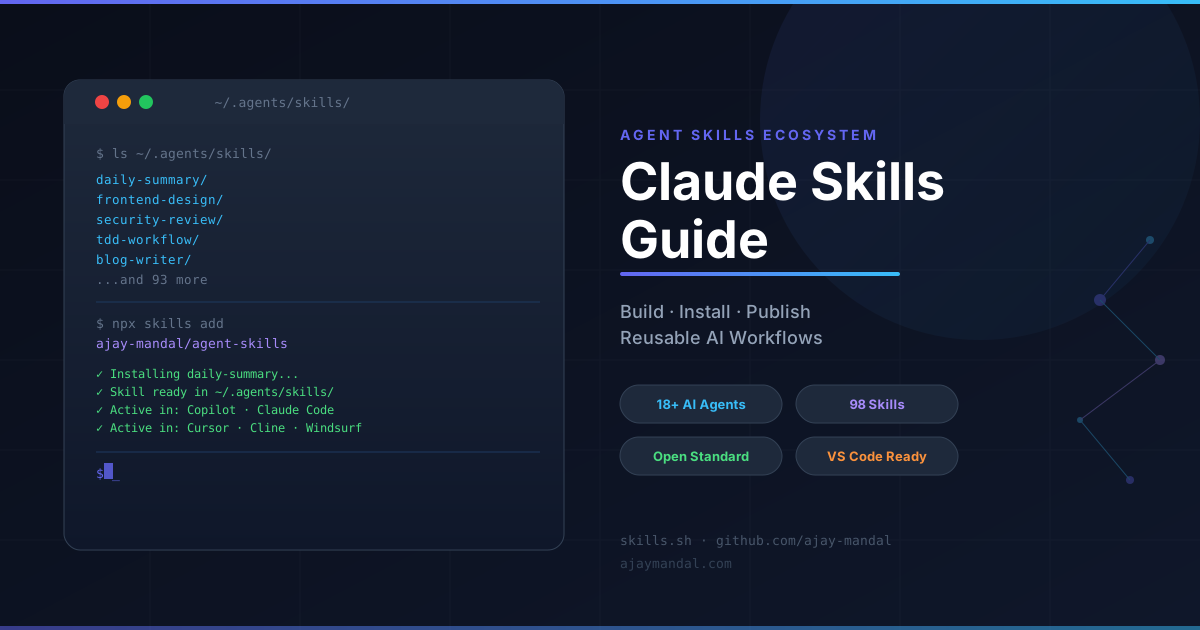
Skills are installed to ~/.agents/skills/ on your machine. Once there, every compatible AI agent picks them up automatically.
Top skills by installs (as of March 2026):
| Rank | Skill | Installs |
|---|---|---|
| 1 | find-skills by vercel-labs |
479K |
| 2 | vercel-react-best-practices |
191K |
| 3 | web-design-guidelines |
150K |
| 4 | frontend-design by anthropics |
138K |
| 5 | remotion-best-practices |
134K |
| 6 | azure-ai by microsoft |
125K |
Anatomy of a Skill
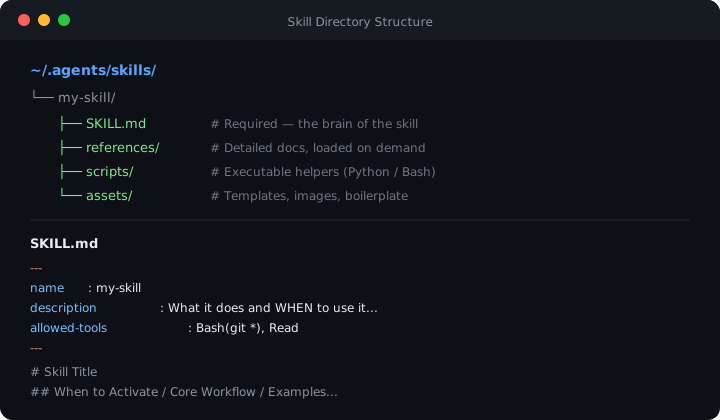
Every skill lives at ~/.agents/skills/<skill-name>/SKILL.md. The structure is simple:
~/.agents/skills/
└── my-skill/
    ├── SKILL.md          # Required — the brain of the skill
    ├── references/       # Optional — detailed docs loaded on demand
    │   └── api-docs.md
    ├── scripts/          # Optional — executable scripts
    │   └── helper.py
    └── assets/           # Optional — templates, images, etc.
        └── template.md
The SKILL.md File
---
name: my-skill
description: What this skill does and WHEN to use it. Claude reads this
to decide whether to activate the skill. Be specific. Max 1024 chars.
disable-model-invocation: false
allowed-tools: Bash(git *), Read
---

# My Skill

## When to Activate

Clear trigger conditions...

## Core Workflow

Step-by-step instructions...

## Examples

Concrete usage examples...
Frontmatter Fields Reference
| Field | Required | Purpose |
|---|---|---|
name |
No | Display name. Lowercase, hyphens, max 64 chars |
description |
Yes | What + when. Most important field for discovery |
disable-model-invocation |
No | Set true for side-effect workflows (deploy, push) |
user-invocable |
No | Set false for background knowledge |
allowed-tools |
No | Tools Claude can use without permission prompts |
context |
No | Set fork to run in isolated subagent |
agent |
No | Subagent type: Explore, Plan, general-purpose |
model |
No | Force model: haiku, sonnet, opus |
argument-hint |
No | Hint shown in autocomplete: [issue-number] |
The Three-Level Context Strategy
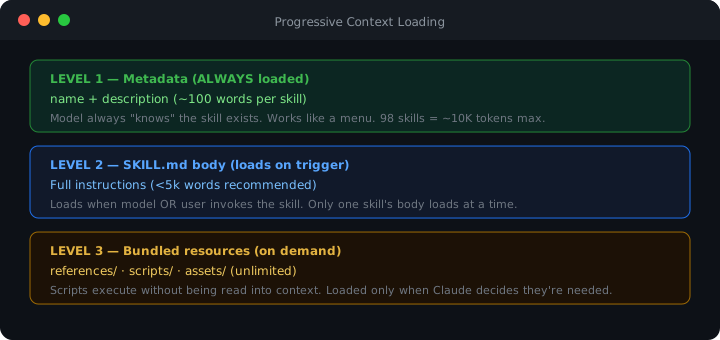
Skills use progressive disclosure to stay efficient:
Level 1: Metadata (always in context)
  → name + description (~100 words)
  → Model always "knows" the skill exists

Level 2: SKILL.md body (loads when triggered)
  → Full instructions (<5k words recommended)
  → Loads on invocation or when model decides

Level 3: Bundled resources (loaded on demand)
  → References, scripts, assets
  → Loaded only when needed
  → Unlimited in theory — scripts run without being read
This means you can have 100 skills installed and the context cost is manageable — only descriptions are always present, full content loads when actually needed.
Building Your Own Skill — A Real Example
Let me walk through how my daily-summary skill actually works. This is a skill I use every day to get a concise engineering summary of my git commits.
The Problem It Solves
Every day I want to know: "What did I actually ship today?" I write to multiple repos, commits are terse, and generating a clean digest used to mean copy-pasting git logs into Claude and explaining what format I wanted. Every. Single. Time.
A skill eliminates all that. Now I just say "daily summary" and the exact right thing happens.
The Skill File
Here is the actual SKILL.md for daily-summary:
---
name: daily-summary
description: Generates a concise engineering notes-style summary of git commits
for a given day, filtered to a specific author. Use this skill whenever the user
says "daily summary", "what did I do today/yesterday", "give me today's notes",
"recap my commits", "summarize my work today", or invokes the skill by name.
---

# Daily Summary

Generate a concise, engineering-notes-style summary of git commits for a given day.

## Step 1: Resolve the target date

- Default to **today** if no date is specified.
- Recognise "yesterday", explicit dates like "March 3", "2026-03-03", or "last Monday".
- Convert to the format `YYYY-MM-DD` for use in git commands.

## Step 2: Collect commits

Run this command from the repo root:

\`\`\`bash
git log \
 --after="<DATE> 00:00:00" \
 --before="<DATE> 23:59:59" \
 --author="your-username" \
 --format="%H %s" \
 --no-merges
\`\`\`

## Step 3: Fetch commit details

For every commit hash returned above, run:

\`\`\`bash
git show <hash> --stat --format="%B"
\`\`\`

## Step 4: Classify changes into thematic buckets

| Bucket             | Signals                                           |
| ------------------ | ------------------------------------------------- |
| **Auth / Guards**  | Firebase guard, RBAC guards, `*auth*`, `*guard*`  |
| **Infra / Build**  | `tsconfig`, `.gitignore`, `turbo.json`, lockfiles |
| **Testing / Docs** | `*.spec.ts`, `*.md` docs                          |

## Step 5: Write the summary

Output exactly 3 bold-headed bullet lines (max 4 for dense days):

> **\<Theme\>** — \<what was built/fixed/changed in 1–2 sentences\>.

Rules:

- Factual and terse — no filler, no "we", no "I"
- File names in **backticks**
- Derive from the diff only — never guess intent
What Makes This Skill Good?
1. The description is specific about trigger phrases. The model knows to activate when you say "daily summary", "what did I do today", "recap my commits". Without this, the model would never know to use the skill.
2. The workflow is deterministic. Steps 1 through 5 are ordered and unambiguous. The model does not have to infer what "summarize my commits" means — it follows a recipe.
3. The format is locked. "Exactly 3 bold-headed bullet lines" prevents the model from writing 15-line essays. The output format is baked in.
4. It uses bash tools. The skill runs real git commands to get real data. It does not rely on the model's memory of commits — it queries the source of truth every time.
Building Your Own — Step by Step
# 1. Create the skill directory
mkdir -p ~/.agents/skills/my-workflow

# 2. Create the SKILL.md
touch ~/.agents/skills/my-workflow/SKILL.md
Open SKILL.md and follow this structure:
Step 1: Write the description first. This is the most important part. Ask: "What would a user say that should trigger this skill?" List those phrases in the description.
---
name: my-workflow
description: Guide for doing X. Use when the user says "do X", "run the X
workflow", or wants to accomplish [specific goal]. Triggers on: [exact phrases].
---
Step 2: Write trigger conditions. The model needs to know when to activate.
## When to Activate

- User says "deploy" or "push to production"
- User asks about [specific topic]
- User wants [specific outcome]
Step 3: Write the deterministic workflow. Number the steps. Be explicit. Do not leave room for interpretation.
Step 4: Lock the output format. If you expect a specific output shape, specify it exactly. Tables, bullet count, section names — be prescriptive.
Step 5: Add examples. Show the ideal interaction. What input → what output.
How Skills Work in VS Code with GitHub Copilot
This is the part almost no documentation covers. Here is exactly how skills become active in VS Code Copilot.
Where to Store Skills
Skills for VS Code Copilot live in one of two places:
# User-global (works in all workspaces):
~/.agents/skills/<skill-name>/SKILL.md

# Workspace-local (scoped to one project):
.github/skills/<skill-name>/SKILL.md
# or
.claude/skills/<skill-name>/SKILL.md
User-global skills are picked up automatically by VS Code Copilot. Workspace-local skills only apply to that project.
Invocation Methods
1. Automatic (model-driven): The model reads all skill descriptions and decides to load a skill when your request matches. If you say "review this for security issues" and you have the security-review skill installed, it loads automatically.
2. Manual (slash command): Type /skill-name in the Copilot chat to explicitly invoke a skill.
3. Conversation trigger: Skills with specific trigger phrases in their description activate when those phrases appear naturally in conversation.
The .instructions.md Pattern
Beyond skills, VS Code Copilot also supports project-level instruction files:
.github/
└── copilot-instructions.md   # Always-on context for all Copilot sessions
This file is always loaded. Use it for:
- Project conventions ("we use Prettier with 2-space indent")
- Tech stack context ("this is a Next.js 15 app with Supabase")
- Team preferences ("always write TypeScript, never use
any")
Skills and instructions work together: instructions provide ambient context, skills provide on-demand procedural knowledge.
The Best Skills to Install Right Now
Based on 98 installed skills and real day-to-day use, here are the ones that consistently deliver the highest value.
Tier 1 — Install Immediately
These skills pay for themselves in the first week.
frontend-design — If you build UIs, this is essential. It prevents the generic "Inter font + purple gradient" aesthetic that every AI generates by default and pushes toward genuinely distinctive interfaces.
npx skills add anthropics/skills frontend-design
security-review — Automatically activates when you touch authentication, user input, or API endpoints. Runs through the OWASP Top 10 mentally for you. Essential for any production code.
tdd-workflow — Enforces test-first development with 80%+ coverage requirements. The model stops suggesting implementations without tests.
daily-summary — (If you write git commits) — Instant engineering notes from your commits. Takes 5 seconds to invoke.
npx skills add ajay-mandal/agent-skills/daily-summary
find-skills — Meta-skill that helps you discover other skills to install. Start here.
npx skills add vercel-labs/skills find-skills
Tier 2 — High-Signal for Specific Stacks
Install these if they match your stack:
| Skill | Use Case |
|---|---|
vercel-react-best-practices |
React/Next.js performance patterns |
nestjs-best-practices |
NestJS module patterns, DI, guards |
backend-patterns |
Node.js API design, error handling |
api-design |
REST resource naming, pagination, error formats |
e2e-testing |
Playwright patterns, Page Object Model |
docker-expert |
Multi-stage builds, image security |
k8s-yaml-generator |
Kubernetes manifests without copying docs |
github-actions-generator |
CI/CD workflows that actually work |
terraform-generator |
Terraform HCL with sane defaults |
Tier 3 — Power User Additions
These skills shine in specific scenarios and are worth having if you hit those scenarios regularly.
brainstorming — Forces exploration before implementation. Prevents the model from jumping to the first solution. Especially valuable for architecture decisions.
strategic-compact — Proactively suggests context compaction at logical task boundaries, preserving context through long sessions.
subagent-driven-development — Enables parallel task execution with independent subagents. Significantly faster for multi-file implementations.
code-review / security-audit-context-building — Deep code review workflows that go beyond surface-level suggestions.
mcp-builder — If you are building MCP servers to extend AI capabilities, this skill knows the patterns cold.
Advanced Patterns
Writing Skills With Dynamic Context
Use the ! shell injection syntax to embed live data into skill invocations:
---
name: pr-review
description: Review the current pull request
context: fork
agent: Explore
---

## Current PR Context

- Diff: !`gh pr diff`
- Changed files: !`gh pr diff --name-only`
- PR description: !`gh pr view --json body -q .body`

Review this pull request for correctness, security issues, and test coverage.
This runs before the model sees the content — the shell commands execute and their output replaces the ! expressions. The model gets live, accurate data.
Skills That Protect Against Side Effects
For skills that push, deploy, or modify shared state, use disable-model-invocation: true:
---
name: deploy-production
description: Deploy to production environment
disable-model-invocation: true
allowed-tools: Bash(npm run deploy), Bash(gh *)
---
With this flag, the model will never decide autonomously to run this skill. The user must explicitly type /deploy-production. This is the safety boundary for destructive or irreversible operations.
Workspace-Scoped Skills for Team Standards
Create project-specific skills that encode your team's conventions:
your-project/
└── .github/
    └── skills/
        ├── api-conventions/
        │   └── SKILL.md   # Your team's API patterns
        └── db-migrations/
            └── SKILL.md   # How to write migrations in your stack
These skills only activate in that project and serve as living documentation that the model actually uses — not a CONTRIBUTING.md nobody reads.
The context: fork Pattern for Heavy Research
When a skill needs to do serious research without polluting the main conversation:
---
name: deep-audit
description: Perform a thorough security audit of the codebase
context: fork
agent: Explore
---

Audit this codebase for security vulnerabilities:
1. Check all API endpoints for authentication
2. Review all user input handling
3. Check for hardcoded secrets
4. Verify CORS configuration

Return a structured report with: finding, severity, file, line, recommendation.
The model spawns a subagent, does the research in isolation, then returns a clean report. The main conversation stays clean.
Building a Skills Library for Your Organization
If you work on a team, skills become institutional knowledge. Here is how to scale this:
Monorepo Approach
company-skills/
├── README.md
├── package.json         # For skills.sh publishing
├── onboarding/
│   └── SKILL.md         # Company onboarding context
├── api-patterns/
│   ├── SKILL.md
│   └── references/
│       └── openapi-spec.yaml
├── database-conventions/
│   └── SKILL.md
└── deployment-workflow/
    ├── SKILL.md
    └── scripts/
        └── validate-deploy.sh
Publishing to skills.sh
Once you have a skills package:
# In your skills repo
npx skills publish

# Team members install with:
npx skills add your-org/company-skills
All skills in the package install to ~/.agents/skills/ on each team member's machine.
Skills as Living Documentation
The most underrated application: encode decisions, not just procedures. A skill like:
---
name: why-we-chose-x
user-invocable: false
---

## Architecture Decisions

**Why Supabase over Prisma Cloud:** We chose Supabase because [reasons]. This
means [implications]. When doing [X], always [Y].

**Why we use Zod not Yup:** [reasoning]

**Auth pattern:** We use Auth.js v5 with [specific configuration] because [reasons].
Set user-invocable: false so the model loads this as background context without exposing it as a user command. Now the model understands why your architecture looks the way it does — and it stops suggesting alternatives that contradict your decisions.
Common Mistakes and How to Avoid Them
Mistake 1: Vague descriptions. "Helps with code" tells the model nothing. Write descriptions that list exact trigger phrases.
Mistake 2: Skills that try to do too much. One skill, one domain. A skill that covers frontend + backend + deployment is a skill that fires for the wrong reasons and gives unfocused guidance.
Mistake 3: Not specifying output format. If you do not lock the output format, the model improvises. A ten-point bullet list is not the same as three bold-headed engineering notes. Be prescriptive.
Mistake 4: Missing the disable-model-invocation flag on dangerous skills. If your skill deploys code, pushes branches, or sends messages — protect it. The model deciding to deploy automatically is not a feature.
Mistake 5: SKILL.md over 500 lines. Beyond 500 lines, the skill starts hogging context when loaded. Move detailed reference material to references/ files. Keep SKILL.md as the entry point.
Putting It All Together
Skills are the infrastructure layer for AI-assisted development that most developers skip. The model is not the bottleneck anymore — the bottleneck is context. How much does the model know about you, your stack, your conventions, your preferences?
Skills solve the context problem systematically. Instead of re-explaining your workflow every session, you encode it once. Instead of getting generic output, you get output shaped by your actual patterns.
The workflow I would recommend:
- Install
find-skillsfirst and use it to discover skills for your stack - Install
security-review,tdd-workflow,frontend-designas baseline quality upgrades - Write a
daily-summaryequivalent for whatever your "end of day recap" looks like - Add workspace-scoped skills for your most opinionated team conventions
The time investment to write a skill is 20-30 minutes. The return is every subsequent AI session being measurably better at your specific domain. That math works out quickly.
And since skills are open, cross-agent, and version-controlled — they are the most durable productivity investment in the current AI tooling landscape.
Resources
- skills.sh — Browse and install community skills
- Anthropic's Complete Guide to Building Skills — Official guide from Anthropic
- skills.sh Docs — Installation, publishing, and registry documentation
- Claude Code Skills reference — Technical specification for SKILL.md format and frontmatter fields